---
title: Domains
description: Organize and manage data efficiently with Domains. Streamline data access, retrieval, and enforce consistency for better decision-making.
---
import { Aside, Steps } from '@astrojs/starlight/components';
# Domains
Domains serve as pivotal frameworks for organizing and categorizing data. They provide a structured approach to managing data, allowing for easier access and retrieval. Domains define specific categories of information such as Finance, HR or Retail. By delineating these domains, you can manage your data assets effectively, enabling smoother operations and more informed decision-making.
## Adding a Domain
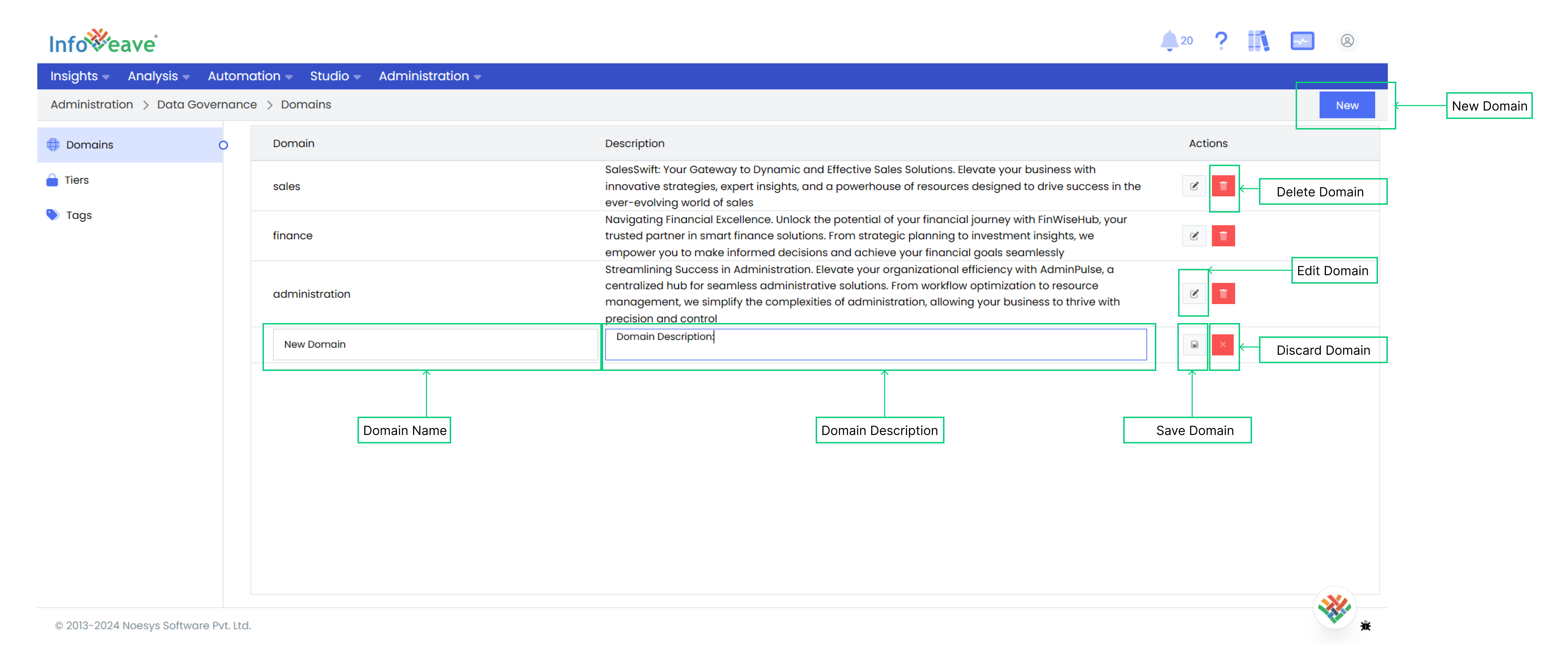
To define a new domain in Infoveave, follow the steps below.
1. To add a new domain, navigate to **Data Governance Domains.**
2. Click on the **Domain** tag in the left side panel. All domains created, if any, will be visible under **Domains.**
3. Click on the **New** button to add a new domain.
4. Enter a unique domain **Name** that reflects the nature of the data it will encompass.
5. Select the **Owner**.
5. Provide a detailed description that outlines the purpose or scope of the domain.
6. Click **Save** to incorporate the new domain into the system.
7. For existing domains, you can edit the information or delete them by selecting the respective actions.